How Many Batteries to Run A Laptop
It can be incredibly frustrating to rely on your laptop for work, entertainment, or simply staying connected, only to find yourself without a reliable power source when you're off-grid. Whether you're living the van life, working from a remote cabin, or just enjoying a weekend camping trip, understanding how to power your essential devices, especially your laptop, is crucial. This comprehensive guide will walk you through exactly how to determine how many batteries you need to keep your laptop charged and ready to go, ensuring you never run out of juice again.
Understanding Your Laptop's Power Requirements
Before you can even think about batteries, you need to get a clear picture of how much power your laptop actually consumes. This isn't just about the wattage listed on its charger; it's about its actual daily energy appetite.
Unpacking Watt-Hours and Amp-Hours
When we talk about off-grid power, two terms are absolutely paramount: watt-hours (Wh) and amp-hours (Ah). Don't let them intimidate you; they're easier to understand than you might think. Watt-hours are essentially the total amount of energy an appliance uses over time. Think of it like this: if you have a 100-watt light bulb on for 1 hour, that's 100 watt-hours. If it's on for 2 hours, it's 200 watt-hours. This is the ultimate metric you need to determine your energy consumption.
Amp-hours, on the other hand, measure the amount of electrical current a battery can deliver for a specific period, usually one hour, at a specific voltage. While watt-hours tell you the total energy storage, amp-hours are directly related to the battery's capacity at its nominal voltage. When you're trying to figure out how many batteries you need, converting your laptop's daily watt-hour consumption into amp-hours at your chosen battery bank voltage (e.g., 12V, 24V) is a critical step. This understanding forms the backbone of how to calculate daily energy usage for any off-grid setup.
Your laptop's power needs vary dramatically depending on the model and what you're doing. A small, energy-efficient Chromebook might only draw 20-30 watts, while a high-performance gaming laptop or a powerful workstation like a MacBook Pro could easily pull 60-100 watts, or even more when charging or running demanding applications. You can often find a laptop's typical power draw in its specifications, on the power brick (look for "Output" in volts and amps, then multiply them to get watts), or by using a watt-meter.
Measuring Your Daily Laptop Usage
Estimating your laptop's power use is one thing, but getting an accurate measure of your actual daily consumption is far more valuable. This is where many off-grid hopefuls go wrong, underestimating their needs and ending up with an undersized system. To truly understand your daily demand, you need to track how long you use your laptop and at what intensity.
For direct AC charging, a simple device like a Kill-A-Watt meter can be plugged between your laptop charger and an AC outlet. This meter will show you the real-time wattage draw and, crucially, accumulate total kilowatt-hours (kWh) or watt-hours over time. Plug it in for a typical day or two, and you'll get a solid number for your daily watt-hour consumption. For DC charging, if you have a USB-C charger that can run directly off a 12V system, a DC power meter or a battery monitor with shunt (like those offered by Renogy or Victron Energy) can provide accurate readings.
Let's imagine you're a digital nomad working from your van. You use your laptop for 6 hours a day for intense video editing (averaging 75W), 2 hours for emails and browsing (averaging 30W), and it idles for another 4 hours drawing minimal power (say, 10W). Your daily calculation would look like this:
- Video editing: 6 hours * 75W = 450 Wh
- Emails/browsing: 2 hours * 30W = 60 Wh
- Idling: 4 hours * 10W = 40 Wh
- Total daily usage: 450 + 60 + 40 = 550 Wh
This 550 Wh is your target number, the energy equivalent of what your batteries need to deliver each day. Remember, the goal here is to get a realistic average. Your usage might fluctuate, but a good average will help you size your battery bank correctly. For a more general understanding of these terms, take a look at our guide on Watts vs Watt-Hours vs Amp-Hours Explained.
Calculating Battery Capacity for Your Laptop
Once you have your laptop's daily watt-hour consumption dialed in, it's time to translate that into actual battery capacity. This involves a few key variables and a bit of straightforward math.
The Basic Formula and Key Considerations
The general formula to calculate the required battery capacity in amp-hours (Ah) is:
(Daily Watt-hours Needed / Battery Bank Voltage) / Usable Depth of Discharge / Inverter Efficiency = Required Amp-Hours
Let's break down each part:
- Daily Watt-hours Needed: This is the number you calculated in the previous section (e.g., 550 Wh for our remote worker).
- Battery Bank Voltage: Most small off-grid systems for laptops use 12V batteries, but larger setups might opt for 24V or 48V for efficiency. For simpler, portable laptop-specific power, 12V is common.
- Usable Depth of Discharge (DoD): This is perhaps the most critical factor for battery longevity. It refers to how much of the battery's total capacity you can safely use before recharging.
- Lead-acid batteries (like AGM or flooded lead-acid) should ideally only be discharged to 50% DoD to maximize their lifespan. So, if you need 100Ah of usable capacity, you'd need a 200Ah lead-acid battery.
- Lithium Iron Phosphate (LiFePO4) batteries are a game-changer because they can be regularly discharged to 80-100% DoD without significant degradation, offering far more usable capacity from a smaller battery.
- Inverter Efficiency: If your laptop charges via an AC adapter, you'll need an inverter to convert your battery bank's DC (Direct Current) power into AC (Alternating Current). Inverters aren't 100% efficient; they lose some energy in the conversion process, typically around 10-15%. So, an 85-90% efficiency factor is commonly used.
Let's do a quick example: If our remote worker needs 550 Wh/day, has a 12V battery bank, uses a LiFePO4 battery (80% DoD), and an inverter that's 90% efficient:
Required Ah = (550 Wh / 12V) / 0.80 / 0.90
Required Ah = 45.83 Ah / 0.80 / 0.90
Required Ah = 57.29 Ah / 0.90
Required Ah ≈ 63.6 Ah
So, for daily laptop use, you'd need roughly 64 Ah of usable battery capacity at 12V.
Choosing Battery Chemistry: LiFePO4 vs. Lead-Acid
The choice of battery chemistry profoundly impacts your system's performance, cost, and longevity. While there are various options, for off-grid solar, the main contenders are lead-acid (primarily AGM for sealed, maintenance-free options) and LiFePO4 (Lithium Iron Phosphate).
Lead-Acid Batteries (e.g., AGM):
- Pros: Lower upfront cost, widely available, proven technology. You can find good AGM options on platforms like Amazon.
- Cons: Heavier, larger, significantly shorter lifespan (often 300-500 cycles), and critically, they should not be discharged below 50% DoD. Discharging them further shortens their life dramatically. They also perform poorly in cold temperatures. This means you need double the rated capacity for the same usable energy compared to LiFePO4.
- Best for: Budget-conscious projects, intermittent or light use, or as a temporary solution.
LiFePO4 Batteries (Lithium Iron Phosphate):
- Pros: Much longer lifespan (2,000-5,000+ cycles), can be discharged to 80-100% DoD regularly, lighter, more compact, and perform better across a wider temperature range (though charging in freezing temps requires a self-heating feature or indoor placement). Brands like Renogy and Battle Born are popular for their reliable LiFePO4 offerings.
- Cons: Higher upfront cost.
- Best for: Serious off-gridders, full-time RVers, remote cabins, or anyone seeking a long-term, reliable, high-performance solution.
Given the superior performance and lifespan, especially the high usable DoD, LiFePO4 batteries are almost always the recommended choice for dedicated off-grid laptop power, even with the higher initial investment. Over their lifespan, they often prove to be more cost-effective. To dive deeper into the financial aspects, check out our article on LiFePO4 vs Lead-Acid Battery Cost.
Accounting for Days of Autonomy
"Days of autonomy" refers to how many days your battery bank can power your loads without any input from your solar panels. This is a crucial safety net for those inevitable cloudy days, bad weather, or simply when your solar panels aren't producing much power (like in winter).
For laptop power, you might think you don't need much autonomy, but what if you have an important deadline and it's raining for two days straight? Suddenly, those backup days become priceless. For most off-grid setups, aiming for 2-3 days of autonomy is a good starting point. If you live in a particularly cloudy region or rely heavily on your laptop, you might even consider 4-5 days.
To incorporate days of autonomy into your battery sizing, you simply multiply your calculated daily amp-hour (or watt-hour) requirement by the number of desired days.
Revisiting our remote worker example (63.6 Ah/day at 12V usable capacity for a LiFePO4 battery):
- For 1 day of autonomy: 63.6 Ah (which is what we calculated). This means a 12V 80Ah LiFePO4 battery would be ideal (80Ah * 0.80 DoD = 64 Ah usable). You could find a compact 100Ah 12V LiFePO4 battery from a brand like Renogy, offering 80Ah of usable capacity, which would be more than enough.
- For 2 days of autonomy: 63.6 Ah/day * 2 days = 127.2 Ah usable capacity. You'd likely need two 100Ah 12V LiFePO4 batteries wired in parallel, giving you 160Ah usable (100Ah * 2 * 0.80 DoD).
- For 3 days of autonomy: 63.6 Ah/day * 3 days = 190.8 Ah usable capacity. This would require two 100Ah 12V LiFePO4 batteries and a smaller one, or a single 200Ah battery and a smaller one, or more practically, a 200Ah 12V LiFePO4 battery (160 Ah usable) and some careful conservation, or three 100Ah batteries for 240Ah usable capacity.
As you can see, days of autonomy significantly increase your battery bank size and, consequently, the overall Cost of an Off-Grid Solar Battery Bank. This entire process is part of a larger strategy when learning How to Size an Off-Grid Battery Bank.
Putting It All Together: Real-World Scenarios and Examples
Let's apply these principles to a couple of common real-world scenarios, so you can see how the calculations play out and what kind of battery solution might work for you.
Example 1: The Remote Worker (High Usage)
Imagine Sarah, a graphic designer who lives in a tiny home off-grid. Her primary tool is a powerful 16-inch MacBook Pro, which can draw up to 96W when charging and running demanding software. On an average workday, she uses it for 8 hours of intensive design work, 2 hours for video calls, and 2 hours for light browsing/email.
1. Calculate Daily Watt-Hours Needed:
- Intensive work (8 hours @ 80W average): 8 * 80W = 640 Wh
- Video calls (2 hours @ 60W average): 2 * 60W = 120 Wh
- Light use (2 hours @ 30W average): 2 * 30W = 60 Wh
- Total daily laptop consumption: 640 + 120 + 60 = 820 Wh
2. Choose Battery Type and Voltage:
Sarah wants reliability and longevity, so she opts for a 12V LiFePO4 battery bank, aiming for 80% usable DoD. She also needs an inverter, which she estimates to be 88% efficient.
3. Determine Days of Autonomy:
Sarah wants 2 full days of backup power for cloudy periods.
4. Calculate Total Usable Ah Required:
- Daily usable Ah: (820 Wh / 12V) / 0.80 DoD / 0.88 Inverter Efficiency
- Daily usable Ah = 68.33 / 0.80 / 0.88 = 85.41 / 0.88 ≈ 97.06 Ah
- Total usable Ah for 2 days: 97.06 Ah/day * 2 days = 194.12 Ah
5. Select Battery Configuration:
To get ~194 Ah of usable capacity from 12V LiFePO4 batteries (80% DoD), Sarah needs batteries with a total raw capacity of: 194.12 Ah / 0.80 DoD = 242.65 Ah.
She could achieve this with:
- Two 12V 100Ah LiFePO4 batteries wired in parallel (160 Ah usable). This might be just shy, so she'd have to be mindful of consumption.
- More ideally, two 12V 120Ah LiFePO4 batteries wired in parallel (192 Ah usable), or a single 12V 250Ah LiFePO4 battery (200 Ah usable).
A single 12V 200Ah LiFePO4 battery from a reputable brand like Renogy would provide 160Ah of usable power. If she consistently hit 820Wh/day, this would give her roughly 1.6 days of autonomy, meaning she might need a second 100Ah battery to comfortably hit her 2-day goal. These types of batteries are readily available from manufacturers or on larger marketplaces like Amazon.
Example 2: The Casual User (Low Usage)
Consider Mark, a student living in his RV. He uses his lightweight laptop (a 13-inch ultrabook) mainly for online classes, streaming, and social media, averaging about 4 hours a day at 25W.
1. Calculate Daily Watt-Hours Needed:
- Daily usage (4 hours @ 25W average): 4 * 25W = 100 Wh
2. Choose Battery Type and Voltage:
Mark also prefers LiFePO4 for its benefits, using a 12V system and an inverter that's 90% efficient.
3. Determine Days of Autonomy:
Mark wants 3 days of autonomy, as he might park in shady spots or have long stretches of bad weather.
4. Calculate Total Usable Ah Required:
- Daily usable Ah: (100 Wh / 12V) / 0.80 DoD / 0.90 Inverter Efficiency
- Daily usable Ah = 8.33 / 0.80 / 0.90 = 10.41 / 0.90 ≈ 11.57 Ah
- Total usable Ah for 3 days: 11.57 Ah/day * 3 days = 34.71 Ah
5. Select Battery Configuration:
To get ~35 Ah of usable capacity from a 12V LiFePO4 battery (80% DoD), Mark needs a total raw capacity of: 34.71 Ah / 0.80 DoD = 43.39 Ah.
He could comfortably achieve this with a single 12V 50Ah LiFePO4 battery (40 Ah usable) or even a 12V 30Ah LiFePO4 battery (24 Ah usable) if he's disciplined with his usage. Many portable power stations that integrate a LiFePO4 battery and inverter are also perfect for this level of casual laptop use. This is a much smaller requirement, illustrating how different laptops and usage patterns drastically alter the battery needs. If you're looking for solutions for a larger setup, our Off-Grid Solar System Sizing Guide can provide a broader perspective.
The Role of the Inverter and Charge Controller
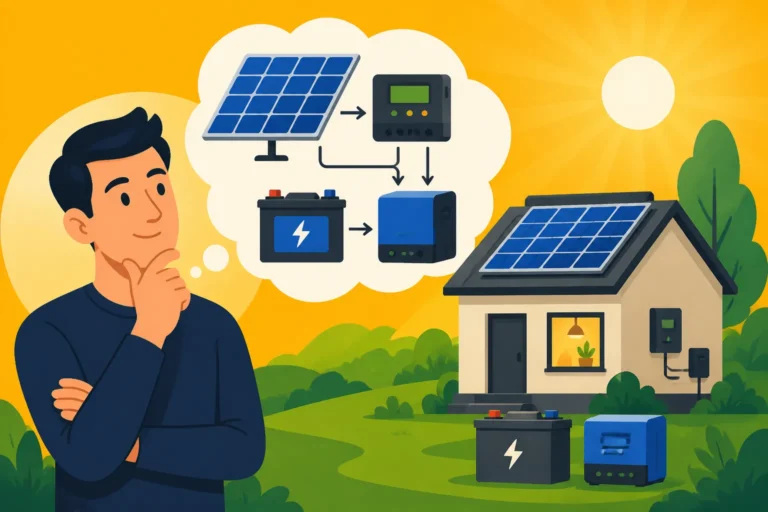
While the focus here is on batteries, it's impossible to talk about powering a laptop off-grid without briefly touching on the inverter and charge controller.
- Inverter: If your laptop charges via its standard wall plug, you must have an inverter to convert the DC power from your batteries into usable AC power. For sensitive electronics like laptops, a pure sine wave inverter is absolutely essential. A modified sine wave inverter can potentially damage your device, cause buzzing noises, or not charge effectively. Many off-grid setups use inverter-chargers, which combine the inverter, charge controller, and sometimes a transfer switch into one unit. Brands like Victron Energy and Renogy offer excellent inverter options for various system sizes. Knowing How to Size an Off-Grid Inverter is another key step in your overall system design.
- Charge Controller: This device sits between your solar panels and your batteries. Its job is to regulate the voltage and current coming from your solar panels to prevent overcharging your batteries, which can severely damage them. For any serious off-grid solar setup, an MPPT (Maximum Power Point Tracking) charge controller is recommended over a PWM (Pulse Width Modulation) controller, as it's significantly more efficient at extracting power from your solar panels, especially in varying light conditions.
Ultimately, the goal is to create a harmonious system where your panels generate enough power to recharge your batteries, and your batteries are sized to meet your daily energy demands, including your laptop's needs, with a comfortable buffer for those unpredictable days. If you're curious about the bigger picture, delving into How to Design an Off-Grid Solar System Step by Step will give you a deeper understanding of all components.
Here's a quick reference table for common laptop types and their estimated battery needs for daily use, assuming a 12V LiFePO4 battery bank with 80% usable DoD and 90% inverter efficiency:
| Laptop Type / Usage Profile | Estimated Daily Watt-Hours (Wh) | Daily Usable Ah (12V LiFePO4) | Recommended Minimum 12V LiFePO4 Battery (Raw Capacity) for 1 Day Autonomy |
|---|---|---|---|
| Light Use (Chromebook, Ultrabook, 2-3 hrs browsing) | 75 Wh | 8.7 Ah | 12V 20Ah LiFePO4 |
| Moderate Use (Standard Laptop, 4-6 hrs work/streaming) | 250 Wh | 29.0 Ah | 12V 50Ah LiFePO4 |
| Heavy Use (Powerful Laptop, 6-8 hrs intensive work/gaming) | 500 Wh | 57.9 Ah | 12V 80Ah LiFePO4 |
| Very Heavy Use (Workstation/Gaming Laptop, 8-10 hrs intensive) | 800 Wh | 92.6 Ah | 12V 120Ah LiFePO4 |
Note: These are estimates. Your actual power draw may vary. Always measure your specific laptop's consumption for the most accurate sizing.
This table illustrates the range of battery sizes needed. For smaller systems, you might find an all-in-one portable power station from brands like EcoFlow or Bluetti perfectly suited for light to moderate laptop use, as they include the battery, inverter, and charge controller. For more robust or permanent setups, assembling individual components, including LiFePO4 batteries from a vendor like Renogy, offers greater flexibility and scalability. Remember that Off-Grid Solar Load Calculation Explained goes into greater detail on how to sum up all your power needs.
Disclaimer
The information provided in this guide is for general educational purposes only and should not be considered professional electrical engineering or financial advice. Always consult with a qualified professional before designing or installing any off-grid solar system to ensure safety and compliance with all local codes and regulations. Off-grid solar systems involve high voltages and currents that can be dangerous if not handled properly.